
You can build a clean signup flow and still lose good users if your email verification step is sloppy.
We see this all the time in SaaS. A user types the wrong email, never gets the link, and drops off. Or your form lets junk addresses through, and your onboarding data gets messy from day one. Both problems hurt growth.
The fix is not just stricter validation. It is a smarter flow. You need a setup that protects your product, keeps signup smooth, and fits your backend logic. In this guide, we will walk through a practical step-by-step approach that balances UX and API integration the right way.
Why Verify Email In Signup Form: Importance of Email Verification
A lot of SaaS teams treat email verification like a small cleanup task. It is not. It shapes who gets into your product, who finishes onboarding, and whoever sees your lifecycle emails.
When you verify emails, you are fixing more than bad formatting. You are catching typos before they become silent churn. You are filtering fake signups that pollute your trial data. You are protecting your sender’s reputation, so real users get your emails later.
This matters right away. If a user cannot receive your welcome email, password reset, or onboarding checklist, your product feels broken even when the app works fine. We also lose clean signals. Your activation numbers get distorted because some accounts were never reachable in the first place.
It also keeps your CRM, billing, and product analytics cleaner from the first day of the account.
Good verification gives you a better starting line. You get cleaner user records, stronger deliverability, and a signup flow that supports real product adoption instead of creating avoidable support issues.
Pick The Right Verification Flow Before You Write Any Code
Before we touch API logic, we need to choose the right verification flow. This is where many teams go wrong. They copy a setup from another product without thinking about risk, friction, or what users need to do next.
We want a flow that catches bad addresses early without turning a simple signup into a trust test.
Soft Checks Vs Hard Checks
Soft checks help you catch obvious issues without slowing people down. Think format validation, common domain typo suggestions, and basic domain checks. Hard checks ask the user to prove access to the inbox, usually with a link, a code, or a double opt-in flow.
Both matter, but they solve different problems. Soft checks reduce mistakes at the form level. Hard checks confirm the email can actually be used. If you run a low-friction trial, soft checks at signup usually make sense. If users can invite teams, access customer data, or create API keys quickly, hard checks should happen earlier.
Decide When To Verify Email Addresses In The User Journey
Timing matters as much as the check itself. Verifying before account creation adds control, but it can hurt conversion. Verifying right after signup is a strong default for most SaaS products. You can also use a staged approach and require full verification before higher-risk actions, which keeps onboarding smooth while still protecting the product.
Design A Signup Experience That Verifies Without Feeling Annoying
Good verification starts in the UI, not in the API. If your signup flow feels hostile, users will leave before the verification process even starts.
Make The Form Feel Smart, Not Suspicious
Your registration form should guide people, not punish them. Use light, real-time checks on key form fields so users can fix mistakes while typing. A simple email checker can flag obvious format issues and catch common domain typos without showing a harsh error state on every keystroke.
Keep the copy clear. Tell users why you ask for an email and what happens next. In most sign-up forms, one line like “We’ll send a confirmation link to finish setup” removes confusion fast. It also sets the right expectation during the registration process.
If you use an email verifier or domain tool, keep the feedback human. Say what to fix, not what they did wrong.
Build A Clear Verification Step Users Can Finish Fast
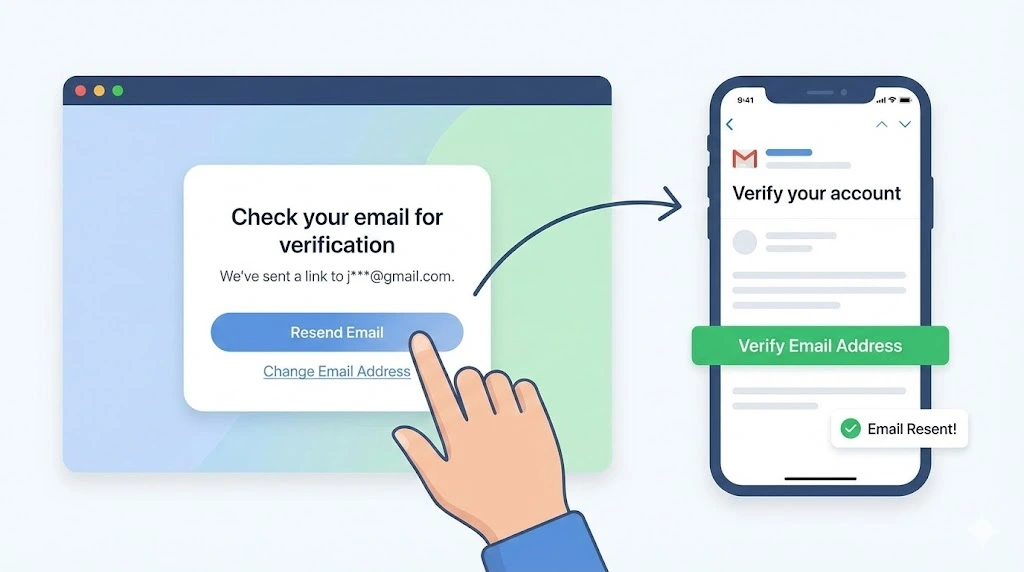
After submission, show a clean confirmation screen with the address masked and a clear resend option. Add a short cooldown so people do not spam the button during failed form submissions.
Give users a “change email” link right there. If the message went to the wrong inbox, they should not have to restart everything.
Your verification email should be short, plain text-friendly, and focused on one action. If the link does not open, provide a code option. The intended recipient should always know what to do next in seconds.
Integrate Email Verification API Logic
This is where UX meets backend discipline. A smooth screen means nothing if your verification logic is messy, slow, or easy to abuse.
Use one clear backend flow and keep each step easy to trace in logs:
- Accept the signup payload and normalize the email domain and casing.
- Run syntax checks first. They help, but they are just the first step.
- Call an email verification service to verify email addresses and score risk.
- Read API signals like mail server reachability, mailbox checks, and whether the host is accepting mail.
- Flag risky patterns, including a disposable email address, a known disposable email provider, or a catch-all domain.
- Create the user in an unverified state and store the verification status in your database.
- Generate a one-time token, send the verification link, and log the event.
Many APIs can check email addresses well, but no provider can guarantee an email address exists or that every message will be delivered successfully. Treat these checks as risk signals, not the final truth.
Verify The User And Update Account State Safely
When the user clicks the link or enters a code, validate the token, confirm it has not expired, and mark the account verified. Make the endpoint idempotent so repeat clicks do not break anything.
Handle retries carefully. If a user requests a resend, replace the old token and keep a short expiry window. Also protect against duplicate signups and avoid account-enumeration hints in errors.
If your provider offers advanced features, use them after signing up, too. Re-check addresses when users change login emails, and keep transactional sends separate from email campaigns. That protects email deliverability, supports better inbox placement, and helps reduce bounce rates and spam complaints over time.
Handle Edge Cases Before They Turn Into Support Tickets
The fastest way to improve signup quality is to handle failure paths before users hit them. Most support tickets come from edge cases you can predict during post-submit actions.
Plan for typo domains, expired links, duplicate signups, and slow delivery windows. These issues look small, but they stack up fast in real SaaS products.
Treat invalid addresses and risky domains differently. If a user makes a clear typo, suggest a fix. If the domain looks suspicious, warn them and let them correct it. If your checks detect a disposable email address, decide whether to block it or allow it with limits based on your product model.
Also, watch for delivery issues that are not user error. Corporate filters can delay mail, and soft bounces can happen even when the address is correct. Keep your verification page helpful. Show resend timing, a change-email option, and simple steps to check spam.
Your email content matters too. If the message is vague, users will not trust it. Write clear copy so users know why they signed up and what click completes verification. The goal is simple: help real users finish fast, stop abuse early, and improve whether emails reach the inbox.
Track What Happens After Launch And Improve The Flow
You cannot improve verification by guesswork. Once the flow is live, track what happens from signup to activation and review the numbers every week.
Watch signup completion, verification completion, time to verify, resend rate, and bounce rates on verification emails. Then compare activation for verified and unverified users. That gap shows whether the flow helps or slows people down.
For example, if resends are high and completion is low, your message copy or timing is likely off. If your team exports metrics to Google Sheets, keep one simple dashboard and review trends weekly.
Run small tests. Try link versus code verification, adjust the confirmation screen copy, or move verification later in onboarding. Review results with product and engineering together. That is how online services keep a clean email list and improve conversion without creating new friction.
The Bottom Line
Email verification works best when you treat it as part of onboarding, not a checkbox in the backend. You need a flow that helps real users register fast, keeps your data valid, and protects your business from junk signups.
Start with a clean form, add smart checks, then connect your API logic to clear user messaging on your website. Keep tracking results so more contacts verify, and fewer emails fail. That balance matters over time, especially for mailing lists. If you want help building and shipping this flow, our email verification service can help.